Autocomplete System Design
使用 RADIO Pattern 設計一個現代化的 Autocomplete 元件,涵蓋需求分析、架構設計、資料模型、API 介面與效能優化
Autocomplete 是前端系統設計面試中最常見的題目之一,被 Google、Meta、Apple、Uber 等大廠頻繁考察。本文將使用 RADIO Pattern 系統性地拆解這個問題。
TL;DR
- 先問需求 — 結果類型?裝置?離線?
- 三層架構 — View → Controller (Hook) → Service (Cache + Network)
- 關鍵優化 — Debounce 300ms、LRU Cache、Race Condition 處理
- 別忘 A11y —
role="combobox"、aria-expanded、鍵盤導航
題目
Design an autocomplete UI component that allows users to enter a search term into a text box, a list of search results appear in a popup and the user can select a result.
難度:Medium ~ Hard
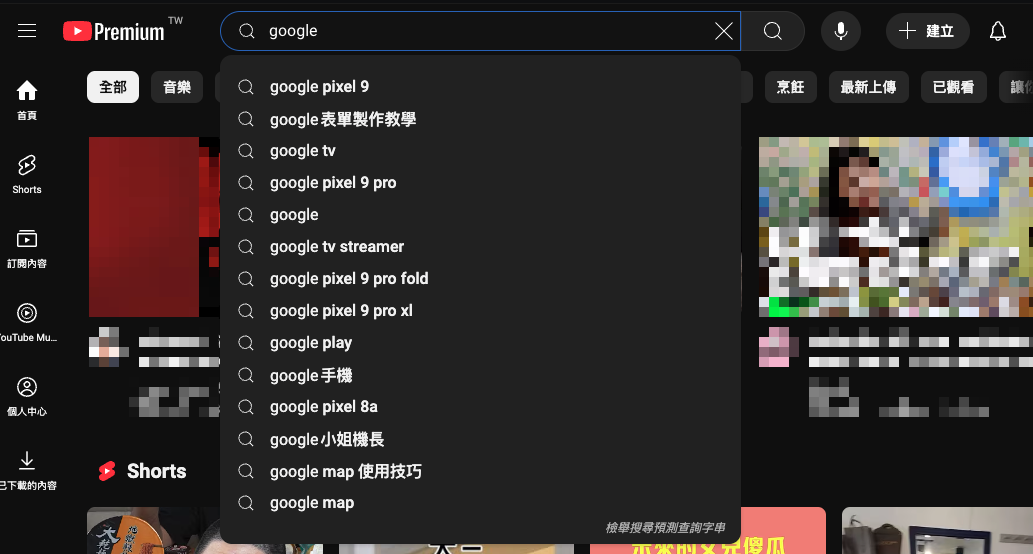
你可能在這些地方看過這個元件:
| 產品 | 特色 | 結果類型 |
|---|---|---|
| Google Search | 即時搜尋建議、歷史紀錄 | 純文字 |
| YouTube | 影片預覽縮圖 | 文字 + 圖片 |
| 好友、粉專、社團 | Rich Media | |
| GitHub | Repo、Issue、User | 混合類型 |
RADIO Pattern 快速導覽
| 階段 | 核心問題 | 產出 |
|---|---|---|
| Requirements | 要解決什麼問題? | 功能清單、限制條件 |
| Architecture | 系統長什麼樣? | 架構圖、元件拆分 |
| Data Model | 資料怎麼流動? | State、Cache、Props |
| Interface | 怎麼使用這個元件? | API 設計、使用範例 |
| Optimizations | 如何做得更好? | 效能、UX、A11y |
R - Requirements(需求釐清)
面試時該問的問題
在開始設計之前,主動向面試官確認需求是展現專業的第一步:
| 問題 | 為什麼重要 | 可能答案 |
|---|---|---|
| 支援哪些結果類型? | 影響 UI 複雜度 | 純文字 / Rich Media / 混合 |
| 目標裝置是? | 影響互動設計 | Desktop only / 全裝置 |
| 需要離線支援嗎? | 影響快取策略 | 是 / 否 |
| 搜尋是 client 還是 server? | 影響架構設計 | Server API / Client filtering |
| 需要模糊搜尋嗎? | 影響實作複雜度 | 精確匹配 / Fuzzy match |
需求分類
Functional Requirements(功能需求)
- 輸入文字時即時顯示搜尋建議
- 支援鍵盤導航(↑↓ 選擇、Enter 確認、Esc 關閉)
- 點擊選項後觸發回調
- 支援自訂結果渲染
Non-Functional Requirements(非功能需求)
- 效能:輸入到顯示結果 < 100ms
- 無障礙:符合 WCAG 2.1 AA 標準
- 可擴展:支援不同資料來源與 UI 樣式
- 響應式:適配各種螢幕尺寸
A - Architecture(架構設計)
高層架構圖
View Layer — React Components
- Input Field — 使用者輸入
- Dropdown List — 搜尋結果
- Loading State — 載入狀態
Controller — useAutocomplete Hook
- State Management — query, results, isOpen
- Event Handlers — input, select, keydown
- Debounce Logic — 300ms 防抖
Service Layer — Cache + Network
- CacheService — LRU 快取
- NetworkService — API 請求
資料流(Data Flow)
元件職責分離
| 層級 | 元件 | 職責 | 原則 |
|---|---|---|---|
| View | Input | 接收輸入、顯示當前值 | 純展示,無邏輯 |
| View | Dropdown | 渲染搜尋結果列表 | 純展示,無邏輯 |
| Controller | useAutocomplete | 狀態管理、事件處理 | 業務邏輯集中 |
| Service | CacheService | 快取讀寫、淘汰策略 | 可替換實作 |
| Service | NetworkService | API 請求、錯誤處理 | 可替換實作 |
D - Data Model(資料模型)
State 設計
interface AutocompleteState<T> {
  // 輸入相關
  query: string;

  // 結果相關
  results: T[];
  isLoading: boolean;
  error: Error | null;

  // UI 相關
  isOpen: boolean;
  highlightedIndex: number;
}

// 初始狀態
const initialState: AutocompleteState<unknown> = {
  query: "",
  results: [],
  isLoading: false,
  error: null,
  isOpen: false,
  highlightedIndex: -1,
};
Cache 設計
為什麼需要 Cache?
- 減少重複的 API 請求(使用者常會刪除再重打)
- 提升回應速度(cache hit 可達 < 1ms)
- 減輕 server 負擔
interface CacheEntry<T> {
  data: T[];
  timestamp: number;
  expiresAt: number;
}

interface CacheConfig {
  maxSize: number; // 最大快取數量,建議 50-100
  ttl: number; // Time to live (ms),建議 5 分鐘
  strategy: "lru" | "fifo"; // 淘汰策略,建議 LRU
}
LRU vs FIFO 選擇:
| 策略 | 優點 | 缺點 | 適用場景 |
|---|---|---|---|
| LRU | 保留熱門查詢 | 實作較複雜 | 大多數情況 |
| FIFO | 實作簡單 | 可能淘汰熱門項 | 簡單場景 |
Props Interface
interface AutocompleteProps<T> {
  // === 核心功能 ===
  fetchSuggestions: (query: string) => Promise<T[]>;
  onSelect?: (item: T) => void;

  // === 受控模式(可選)===
  value?: string;
  onChange?: (value: string) => void;

  // === 行為配置 ===
  debounceMs?: number; // default: 300
  minQueryLength?: number; // default: 1
  maxResults?: number; // default: 10

  // === 自訂渲染(Render Props Pattern)===
  renderItem?: (item: T, highlighted: boolean) => ReactNode;
  renderEmpty?: () => ReactNode;
  renderLoading?: () => ReactNode;

  // === 無障礙 ===
  id?: string;
  ariaLabel?: string;
  placeholder?: string;
}
I - Interface(介面設計)
Component API 使用範例
基本使用:
<Autocomplete
  fetchSuggestions={async (query) => {
    const res = await fetch(`/api/search?q=${query}`);
    return res.json();
  }}
  onSelect={(item) => console.log("Selected:", item)}
  placeholder="Search..."
/>
完整配置:
interface User {
  id: string;
  name: string;
  avatar: string;
  email: string;
}

<Autocomplete<User>
  // 核心
  fetchSuggestions={searchUsers}
  onSelect={(user) => router.push(`/users/${user.id}`)}
  // 行為
  debounceMs={300}
  minQueryLength={2}
  maxResults={8}
  // 自訂渲染
  renderItem={(user, highlighted) => (
    <div className={cn("flex items-center gap-3 p-2", highlighted && "bg-blue-50")}>
      <img src={user.avatar} className="w-8 h-8 rounded-full" />
      <div>
        <p className="font-medium">{user.name}</p>
        <p className="text-sm text-gray-500">{user.email}</p>
      </div>
    </div>
  )}
  renderEmpty={() => <p className="p-4 text-center text-gray-500">No users found</p>}
  // 無障礙
  id="user-search"
  ariaLabel="Search for users"
  placeholder="Type a name..."
/>;
Server API 設計
// GET /api/search?q={query}&limit={limit}&offset={offset}

// Request Query Params
interface SearchParams {
  q: string; // 搜尋關鍵字
  limit?: number; // 每頁數量,default: 10
  offset?: number; // 分頁偏移,default: 0
}

// Response
interface SearchResponse<T> {
  results: T[];
  total: number;
  hasMore: boolean;
}

// Error Response
interface ErrorResponse {
  error: string;
  code: "INVALID_QUERY" | "RATE_LIMITED" | "SERVER_ERROR";
}
O - Optimizations(優化策略)
1. Debounce(防抖)
問題:每次按鍵都發送 API 請求會造成伺服器負擔過重、網路資源浪費、Race condition 風險。
核心概念: 等待使用者停止輸入一段時間後才觸發搜尋。
// 簡化版 - 實務上可用 lodash.debounce 或 use-debounce
const debouncedSearch = useDebouncedCallback((query: string) => {
  fetchSuggestions(query);
}, 300);| 裝置 | 建議延遲 | 原因 |
|---|---|---|
| Desktop | 300ms | 打字快,短延遲 |
| Mobile | 400-500ms | 虛擬鍵盤打字較慢 |
2. Race Condition 處理
問題:使用者快速輸入 "react" → "redux",如果 "react" 的請求比較慢,可能會覆蓋 "redux" 的結果。
兩種解法:
| 方法 | 優點 | 缺點 |
|---|---|---|
| Request ID | 簡單、不依賴 API | 舊請求仍會完成 |
| AbortController | 真正取消請求 | 需要 API 支援 |
// 方法一:Request ID - 只用最新請求的結果
const requestId = useRef(0);

async function search(query: string) {
  const currentId = ++requestId.current;
  const result = await fetchSuggestions(query);

  // 丟棄過期的結果
  if (currentId !== requestId.current) return;

  setResults(result);
}
// 方法二:AbortController - 取消前一個請求
const controllerRef = useRef<AbortController>();
async function search(query: string) {
controllerRef.current?.abort(); // 取消前一個
controllerRef.current = new AbortController();
const result = await fetch(`/api/search?q=${query}`, {
signal: controllerRef.current.signal,
});
}3. LRU Cache
為什麼用 LRU? 保留最近使用的查詢,刪除最久沒用的。使用者常會刪除再重打,cache 可大幅提升體驗。
核心邏輯:
class LRUCache<T> {
  private cache = new Map<string, { data: T[]; expiresAt: number }>();

  get(key: string): T[] | null {
    const entry = this.cache.get(key);
    if (!entry || Date.now() > entry.expiresAt) return null;

    // LRU 關鍵:移到最後(最新)
    this.cache.delete(key);
    this.cache.set(key, entry);
    return entry.data;
  }

  set(key: string, data: T[]): void {
    // 超過容量,刪除第一個(最舊)
    if (this.cache.size >= 100) {
      const oldest = this.cache.keys().next().value;
      this.cache.delete(oldest);
    }
    this.cache.set(key, { data, expiresAt: Date.now() + 5 * 60 * 1000 });
  }
}
建議配置: maxSize: 50-100、TTL: 5 分鐘
4. Keyboard Navigation
| 按鍵 | 行為 |
|---|---|
↓ ArrowDown | 高亮下一個選項 |
↑ ArrowUp | 高亮上一個選項 |
Enter | 選擇當前高亮項 |
Escape | 關閉下拉選單 |
Tab | 移到下一個表單元素 |
function handleKeyDown(e: KeyboardEvent) {
  switch (e.key) {
    case "ArrowDown":
      e.preventDefault();
      setHighlightedIndex((prev) => Math.min(prev + 1, results.length - 1));
      break;
    case "ArrowUp":
      e.preventDefault();
      setHighlightedIndex((prev) => Math.max(prev - 1, 0));
      break;
    case "Enter":
      if (highlightedIndex >= 0) onSelect(results[highlightedIndex]);
      break;
    case "Escape":
      setIsOpen(false);
      break;
  }
}
5. Accessibility(無障礙)
為什麼重要? 法規要求(ADA、WCAG)、提升使用者體驗、SEO 加分。
必要的 ARIA 屬性:
| 元素 | 屬性 | 說明 |
|---|---|---|
| Container | role="combobox" | 標識元件類型 |
| Container | aria-expanded | 選單是否展開 |
| Input | aria-autocomplete="list" | 有自動完成列表 |
| Input | aria-activedescendant | 當前高亮選項 ID |
| List | role="listbox" | 標識列表 |
| Option | role="option" | 標識選項 |
| Option | aria-selected | 是否被選中 |
<div role="combobox" aria-expanded={isOpen} aria-haspopup="listbox">
  <input
    aria-autocomplete="list"
    aria-activedescendant={highlightedIndex >= 0 ? `option-${highlightedIndex}` : undefined}
  />
  <ul role="listbox">
    {results.map((item, i) => (
      <li key={i} id={`option-${i}`} role="option" aria-selected={i === highlightedIndex}>
        {item.name}
      </li>
    ))}
  </ul>
</div>
Deep Dive:常見追問
面試官可能會追問這些進階問題,準備好簡短的回答。
Q1: 如何處理大量搜尋結果?
答:Virtual Scrolling — 只渲染可視區域的 DOM,使用 @tanstack/react-virtual 或 react-window。
Q2: 如何實作 Highlight Matching Text?
function highlightMatch(text: string, query: string) {
  const escaped = query.replace(/[.*+?^${}()|[\]\\]/g, "\\$&");
  const parts = text.split(new RegExp(`(${escaped})`, "gi"));
  return parts.map((part, i) =>
    part.toLowerCase() === query.toLowerCase() ? <mark key={i}>{part}</mark> : part,
  );
}
// highlightMatch("TypeScript", "type") → <mark>Type</mark>Script
Q3: 如何處理網路錯誤?
答:Retry with Exponential Backoff — 失敗後等待 1s、2s、4s... 重試,最多 3 次。也可以 fallback 到 cache 資料。
Q4: Mobile 有什麼特殊考量?
| 考量 | 解法 |
|---|---|
| 虛擬鍵盤遮擋 | 調整 dropdown 位置或用 modal |
| 點擊區域太小 | 增加 padding,至少 44x44px |
| 打字較慢 | 增加 debounce 到 400-500ms |
總結
使用 RADIO Pattern 設計 Autocomplete,我們系統性地處理了:
| 階段 | 關鍵產出 |
|---|---|
| R Requirements | 功能/非功能需求清單、面試提問技巧 |
| A Architecture | 三層架構圖、資料流設計、職責分離 |
| D Data Model | State 結構、Cache 策略、Props Interface |
| I Interface | Component API、Server API 設計 |
| O Optimizations | Debounce、Race Condition、LRU Cache、A11y |
面試技巧提醒
- 先問再答 — 展現需求分析能力
- 畫圖說明 — 架構圖比程式碼更有說服力
- 說明 Why — 不只說做什麼,還要說為什麼
- 提出 Trade-offs — 沒有完美方案,只有適合的方案
- 考慮邊界情況 — 空結果、錯誤處理、大量資料